
EN
Request a demo
VOX-S software conference platform

Voice and Vote.

A conference room on ordinary tablets and laptops.

Speeches, documents, voting, simultaneous interpretation, cameras and broadcasting in one system — no consoles at every seat.
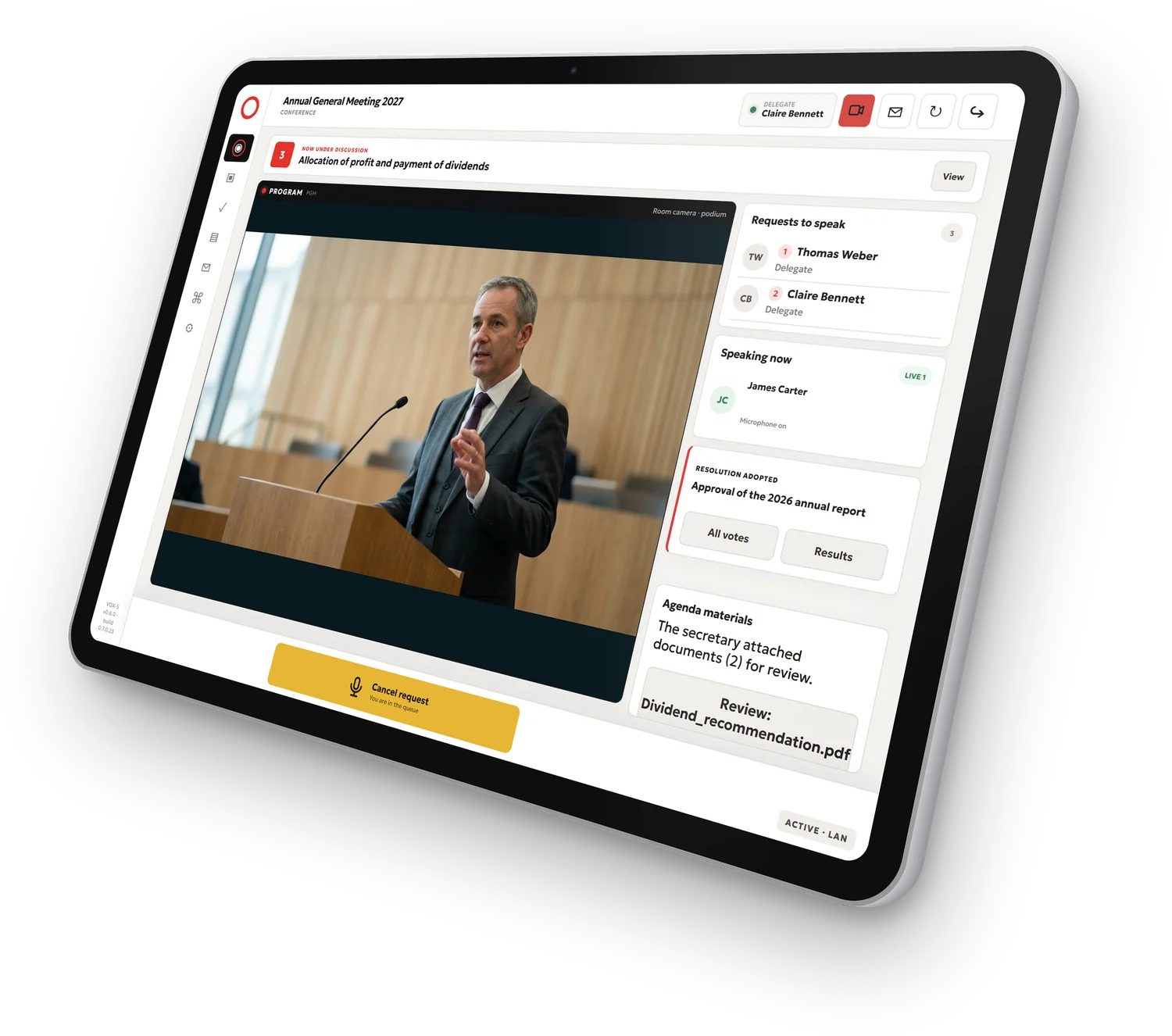
  • Any device — tablet, laptop or phone
  • The camera finds the speaker
  • Minutes in every participant’s language
  • Everyone listens in their own language
VOXORDIA delegate screen on an iPad: agenda, live programme, speakers’ queue and voting results
Why

VOXORDIA conference platform —
complex made simple

VOXORDIA turns your meeting room into a single system:

  • participants’ own devicesinstead of consoles
  • one systeminstead of five, six, seven…
  • a server updateinstead of replacing equipment
Conventional room Central unitInterpretingVideoRecordingVoting a cable to every console VOXORDIA Server switch · Wi‑Fi participants’ devices
Cheaper

No need to buy lots of different equipment and a console for every participant, or to lay cables.

Simpler

One interface for participants, the chair, the secretary and the operator. Everything you need is at hand at the key moment.

More reliable

Less equipment means fewer points of failure. No exotic modules — just a server, a switch and a Wi-Fi access point. And, of course, a tablet, laptop or phone for each participant.

More secure

Participants’ audio and video are encrypted, and the system runs inside your network. Only invited participants get in — with personal access and a PIN that is valid for the duration of the meeting. Unauthorised connections are rejected.

More flexible

Hold a meeting in any hall or meeting room of your company — wherever it is needed today. The only requirement is fast Wi-Fi with a route to the server. New features are added with a licence, without replacing equipment.

Video · 0:50 · What VOX-S is: participants on their own tablets, the floor and the queue, the chair's console, everything on your server.
Try it yourself

The delegate console — right in your browser

This is an interactive model of a participant’s screen. Ask for the floor, vote, choose an interpretation channel, open a document in Materials and mark it up together with colleagues, or call staff. The panel below the console plays the chair, the secretary and the operator.

The model runs in your browser and sends no data anywhere.

Before the meeting

A meeting starts with a booking

The room is booked in the same place where the meeting is later held. Participants receive a personal invitation, reply with one button and see the agenda and documents before it begins.

  1. 1
    Room bookingAn employee signs in through Active Directory or with their own QR, sees the free time for the week and books. Other people’s topics and line-ups stay hidden.
  2. 2
    InvitationsThe secretary sends personal invitations by e-mail or Telegram — with the room, address, time and a confirmation link.
  3. 3
    Participant’s reply“I’ll attend” or “Can’t make it” — one button. The secretary sees the replies in a list; a remote participant receives their access.
  4. 4
    Waiting screenBefore the start the participant sees the agenda and the documents opened in advance. At the start the connection happens on its own.
Remote participation

A participant from anywhere — as if in the hall

Not everyone can travel. A remote participant opens a personal link or QR code and joins their own meeting: hears the room, watches the broadcast, asks for the floor, votes and shows documents.

  • Join by link, QR code or codeNo registration and nothing to install. The code stays valid until the meeting closes — after a dropped connection the participant returns with the same code.
  • The same rights as in the hallThe floor, voting and documents — exactly per the participant rights the secretary has set.
  • Sound and video go straight to your serverThe shared portal only lets people in by key. Media never touch it; there is no third-party cloud.
  • Works on mobile data tooLightweight video and broadcast profiles are available for remote participants.
Hybrid and external meetings

Hall and online — one meeting

For VOX-S an external meeting is one more guest at the table. The hall hears and sees remote colleagues; they hear the hall and watch the programme picture. Minutes, voting and recording stay on your server.

  • Zoom*

    Plan the meeting once in VOX-S — the hall joins Zoom by itself. You connect your own account; nothing is stored with us.

  • Microsoft Teams*

    The meeting appears in the organiser’s calendar and the hall joins by itself. Passwords and codes are never stored with us.

  • Google Meet**

    The meeting is created in your own Google account and the hall joins by link. The keys stay on your server.

  • SIP*

    Connect the hall to a meeting room or video-conferencing system that supports SIP — no extra apps, no cloud in between.

* Pilot. The connection works in trial mode. We enable it by arrangement; features may change.

** In development. The connection is not released yet. We cannot promise features or dates: we test on real meetings first.

  • The hall and online guests see and hear each otherRemote colleagues are heard and seen in the hall, and the meeting receives the hall’s sound and the programme picture. Remote participants never get their own voices back.
  • Sound and video never pass through our serversThey flow between your server and the meeting provider. They do not pass through connect.voxordia.com: the gateway only issues the pass.
  • The keys stay in your vaultAccess tokens sit in the protected vault of your server. The administrator manages the connection in the VOX-S Service interface.

Each provider needs a licence for its VOX-S adapter and an active subscription with the provider itself. Other providers connect through the same layer of adapters, SIP and SDKs, one at a time, and are enabled only after a check in a real meeting. Statuses reflect readiness on the publication date; pilot connections are by arrangement. Which data is processed — see the Privacy Policy.

Video · 0:56 · Simultaneous interpretation, the camera that finds the speaker, one signal map, remote colleagues, AES67, Dante, NDI, ONVIF and RTSP.
Room control

The hall switches on with one touch

Press “Start” and the hall switches to meeting mode: lights, screens, cameras. You draw the panel yourself, and we set up the scenarios for your hall.

A sample panel. You decide which buttons it has.

A panel made for you

Draw it yourself, no programmer needed: buttons, switches, pictures and live video from cameras. Every button shows its own state.

Right where you need it

A tablet at the hall door and the same console for the technical specialist right inside the meeting. Connect it by QR code — and it works.

The meeting runs the hall

The presenter takes the floor — the hall reconfigures. The recording starts — the display lights up. And the other way round: one tap gives the floor or closes all microphones.

We connect what you already have

Lights, screens, projectors, blinds — anything controlled over the network. Drivers for different types of equipment are written and constantly added.

Only the truth on the panel

A button shows what actually happened, not what you pressed. You always see the real state of the hall.

Calm before the meeting

One button checks that everything is ready: the panel, the tablets, the connection. You can run a scenario in advance — nothing reaches the hall.

Minutes

Minutes in every participant’s language

While the meeting runs, the system records every speech. Afterwards it recognises the speech, builds the timeline and translates the approved text into the meeting’s languages. All of it happens on your server: not a single sentence goes to the cloud.

  1. 1
    RecognitionEach speaker’s words become text tied to the timeline.
  2. 2
    ReviewThe secretary corrects individual phrases and approves the transcript.
  3. 3
    TranslationThe approved text is translated into the participants’ languages automatically.
  4. 4
    ArchiveThe minutes in every language are stored and never change again.
  5. 5
    PDF to signTimeline, voting results with the decision and documents with marks. A green bar at the top — everything has been checked.
ENRUDEFR
Approved
Minutes of the meetingAnnual General Meeting · 12 May 2027
2. Distribution of profit and payment of dividends
Olga Smirnova, Chair

We now move to item two of the agenda. The floor goes to the Chief Financial Officer.

Dmitry Orlov, Chief Financial Officer

We propose allocating forty percent of net profit to dividends.

Vote

For — 64 %, against — 22 %, abstained — 14 %. The resolution is adopted.

Translated on the meeting server
For every role

What changes for everyone in the room

  • ChairQueue, priority and “Next” in one tap. The whole room on one screen.
  • SecretaryParticipant list from Excel, invitations by e-mail and Telegram, replies in one list. The minutes compile themselves.
  • DelegateAn invitation with confirmation, documents before the start. The floor, the vote and the materials on their own device.
  • InterpreterA workstation of their own: the room on screen, on air with one button.
  • Remote participantJoin by link. Hears, speaks and votes — as in the room.
  • StaffBook the room themselves: free time for the week, sign-in through Active Directory or QR.
  • IT and securityServer in your network, Active Directory sign-in, action log.
Features

Everything a formal meeting needs

Speaking order

Requests to speak, a queue, open discussion and chair priority. The order changes during the meeting, and a break is called with one command: microphones close and the display shows when we resume.

Chair’s view

Voting by the articles

From yes / no / abstain to voting by shares and cumulative elections. The electorate is fixed when a vote opens, results cannot be changed, and a secret ballot stays secret.

All procedures

Simultaneous interpretation

Interpreters work inside the system; participants choose the language on their own device. If the interpreter is silent, the floor comes through; a handover happens without a pause.

More on interpretation

Camera and broadcast without a director

Switch on the microphone and the camera is already on you. The system builds the picture for room screens, broadcast and recording, and an operator can take over at any time.

Minutes and transcript write themselves

While the meeting runs, the system keeps the timeline: who took the floor and when, what was said, which documents were shown, how the room voted. Speech is recognised on your server, without any cloud, and the approved minutes are translated into the participants’ languages.

Minutes in several languages

A console for every role

The chair gets the queue and room control, delegates the broadcast and documents, interpreters their language. An administrator builds the screen for each role in minutes, and each participant adjusts it in one move.

Try the console
Also

  • Agenda and documentsDocuments open on time; speakers find their materials at the lectern.
  • Prepared in minutesParticipant lists from Excel, CSV or ODS, list templates, a copy of the last meeting.
  • Clean soundNo echo and no own voice in the speaker. Nobody hears a closed microphone.
  • Active Directory sign-inWork logins without extra passwords; automatic on domain computers.
  • QR badgeScan the name badge and the participant is in their meeting with their rights.
  • Private chatMessages travel through your server and are deleted when the meeting closes — nothing goes to the archive.
  • Staff callTea, water or a technician in one tap; staff see the seat number.
  • Information displaysSchedule, a document page by page or your own text — on any screen in the room. Templates in company colours, your own background, scenes for breaks and speaker calls.
  • Several roomsRooms and seats are described once; each conference picks its room.
  • Interface in six languagesA new language is added from the catalogue; the administrator edits the labels.
  • One-package installationThe server is deployed with a single installer in your network.
  • Security logSign-ins and administrator actions are recorded; you set the retention period.
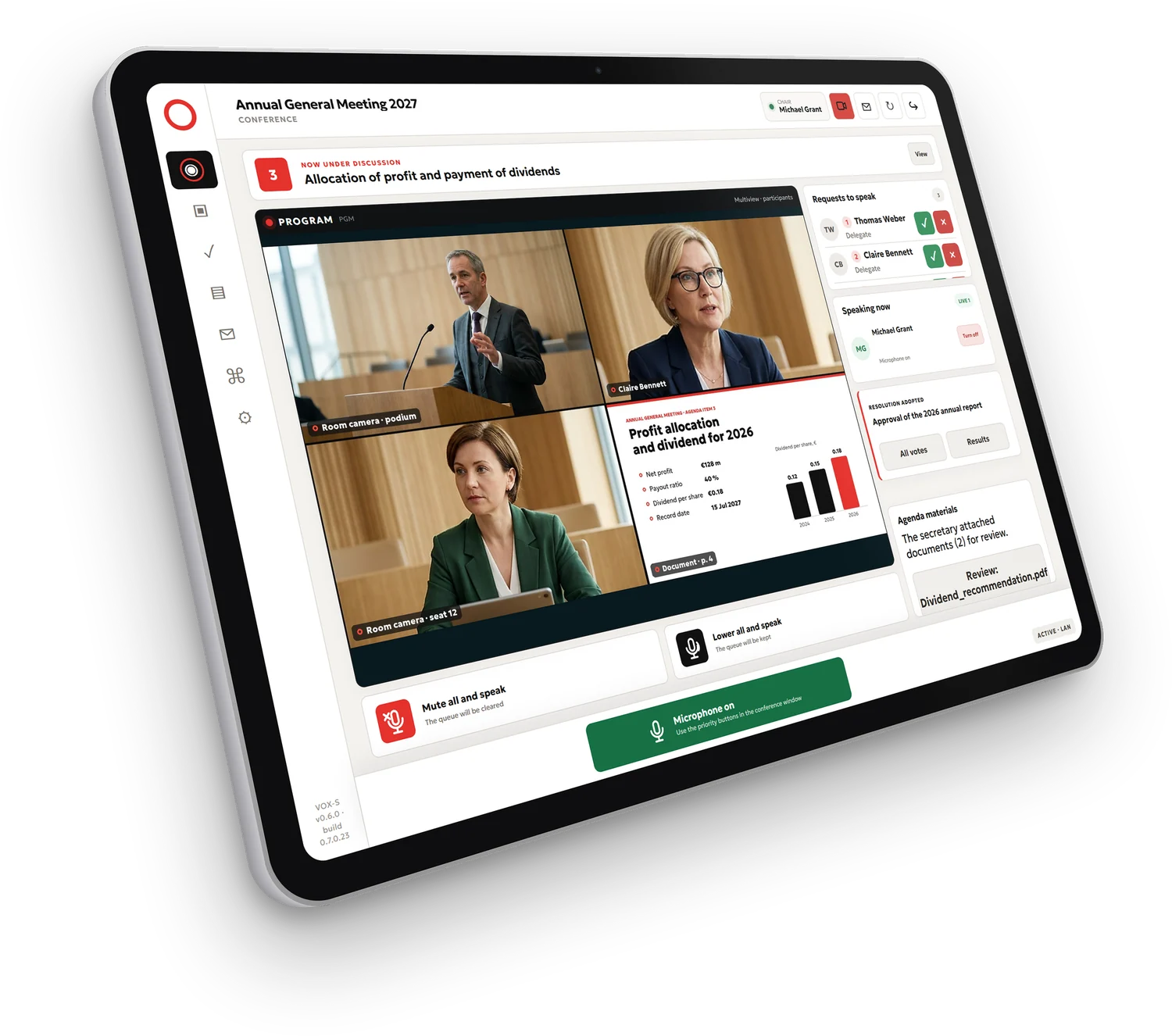
VOXORDIA chair screen on an iPad: multiview of room cameras, a participant’s camera and a document, microphone on
Chair

The whole meeting on one screen

The chair sees who is asking for the floor and who is speaking, and gives or withdraws the floor with one tap. The main screen shows several views at once: the room camera, a participant’s camera and the document on display.

  • Give the floor or decline a requestThe queue is always in view.
  • Chair priorityMute everyone and speak — or lower the room and keep the queue.
  • MultiviewRoom cameras, participant cameras and the document in one picture.
Voting

Voting you can trust

The list of voters is fixed when the vote opens, results cannot be changed after it closes, and a secret ballot stays secret: the system records participation but never links it to the choice.

Counting follows your articles of association or rules of procedure exactly: what the quorum is based on, whether the majority is counted from those present or from the full membership, and which threshold each type of decision requires.

Fits any procedure
  • Open, secret and roll-call voting
  • Voting by shares and stakes — for shareholder, member and partnership meetings
  • Cumulative voting for board elections
  • Simple, absolute and qualified majority — for example, three quarters
  • Quorum and counting base: those present or the full membership
  • Ranked voting, multi-round elections, your own rule templates

Counting rules are set up to match the articles and rules of procedure of your company or body.
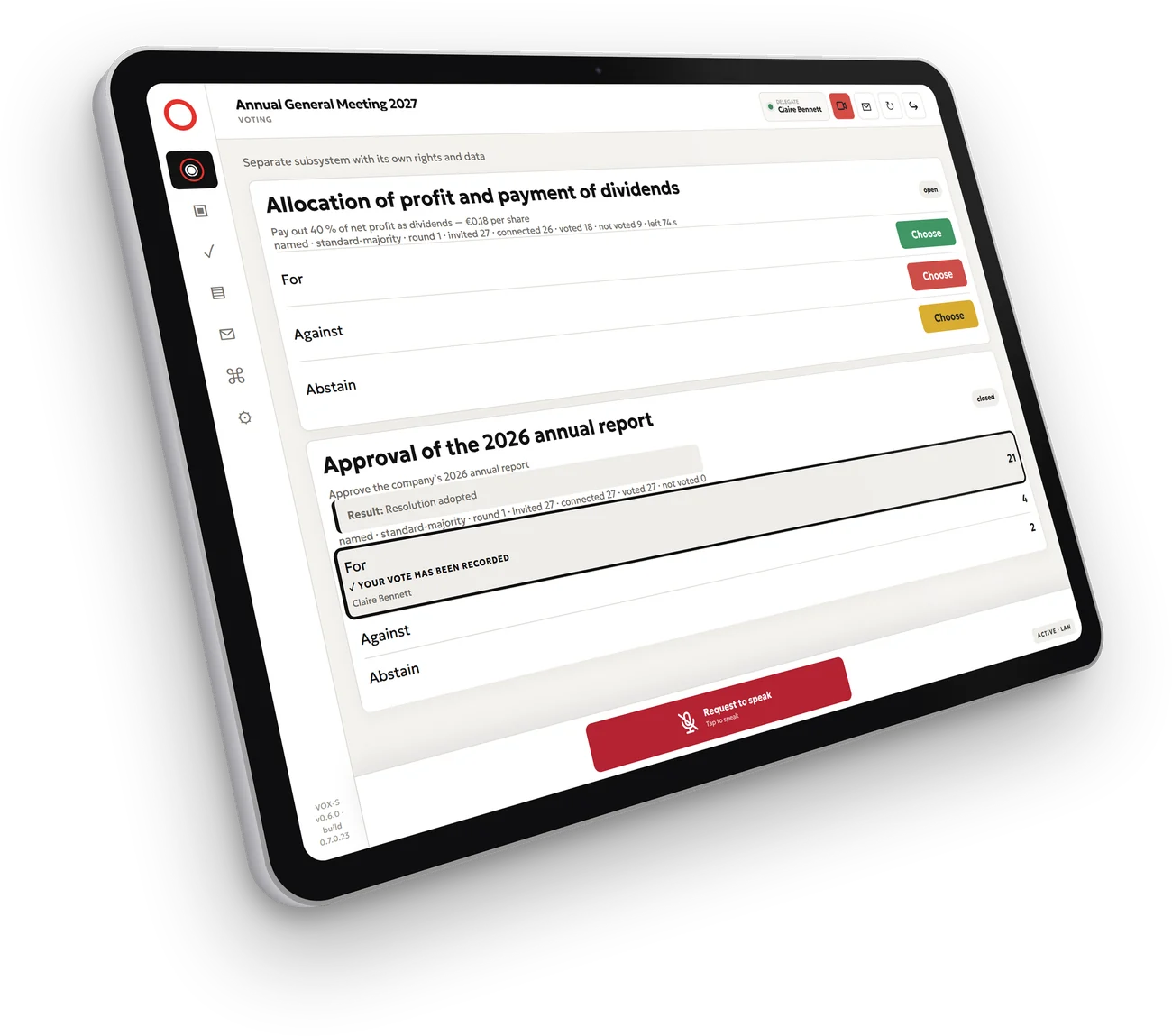
VOXORDIA voting page on an iPad: “For”, “Against”, “Abstain”, turnout and timer
Video · 0:43 · Voting you can trust, documents for every agenda item, and minutes that write themselves.
Documents

Working on a document together

The presenter opens a document and every participant sees the same page at the same zoom. Marks appear for everyone at once, each in its author’s colour and with their name.

  • Pen, highlighter, line, circle and textUnderline a figure, circle a paragraph, leave a note in the margin.
  • Everyone has their own colourYou see at once who marked what. Other people’s marks cannot be erased or moved.
  • Follow the presenterZoom into a detail or look ahead, then return to the presenter with one tap.
  • Show in the hallThe document goes to the hall screens together with its marks — full screen or as a separate multiview tile.
  • Pointer and beaconThe chair guides a red arrow across the document with a mouse or a finger, and everyone sees it, including on the hall screens. A double tap flashes a beacon. The pointer belongs to one person at a time; the others ask for it.
  • Draft before the showMark up your own file in advance: until the show starts, only you can see it.

Who may annotate and show documents in the hall is set by participant rights — separately for planned and quick meetings.

Try it in the console
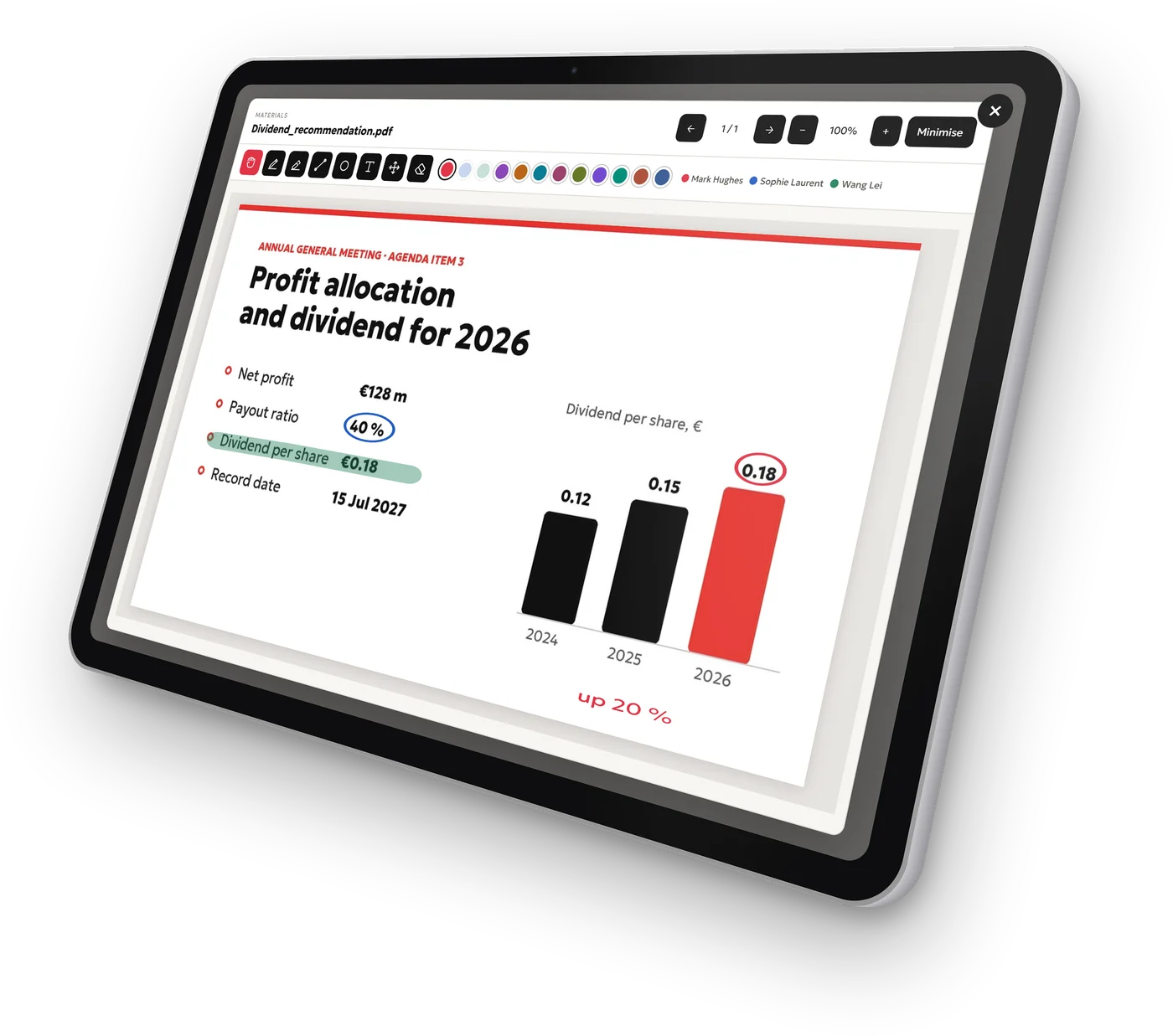
Document viewer in VOX-S: annotation tools, colour palette, list of authors and a document marked up by three participants
Video · 1:38 · Same page and zoom for everyone, marks in each author's colour, the pointer and beacon, asking for the pointer. Recorded on a real VOX-S 0.8.41 server.
Simultaneous interpretation

Everyone hears the meeting in their own language

Interpretation is built into the system, not bolted on. The operator sets up the languages and assigns interpreters; each participant chooses language and volume on their own device — the meeting picture stays the same.

  • A channel for each languageAnd if the interpreter is silent, the original sound from the room comes through.
  • Interpreter deskThe room on screen, who is speaking, the route “listening → interpreting”, on air and cough in one tap.
  • Main and backup interpreterHandover without a pause, and relay interpretation for rare languages.
  • Interpretation channels recordedEvery language is saved together with the meeting recording.
For technicians and integrators

The room is set up in a browser

No separate software and no site visits with a laptop: the room layout, cameras, audio and video are configured in an ordinary browser, and changes are checked before they are applied.
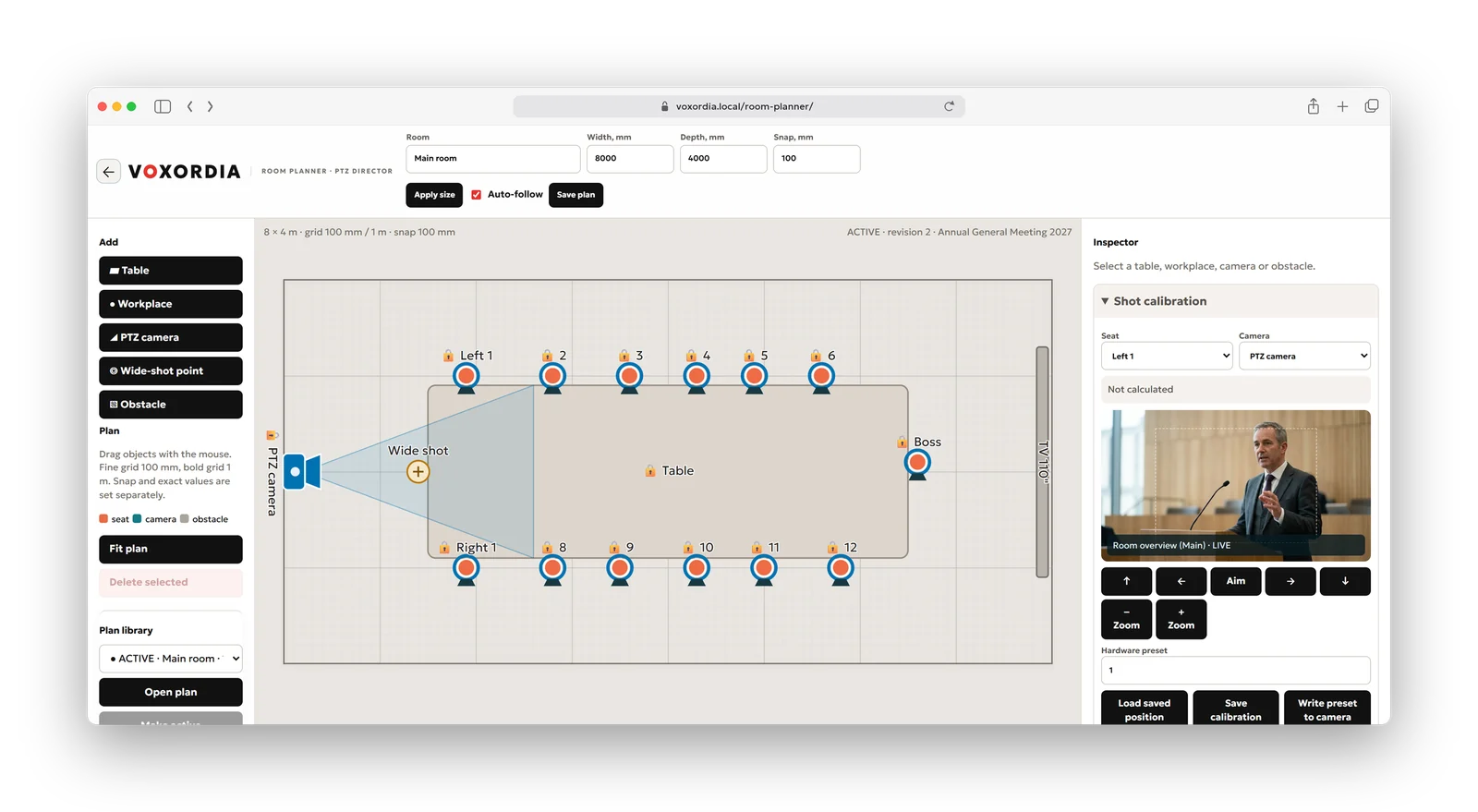
Room layout in the browser: participants’ seats, a PTZ camera and shot calibration
Room layout and camerasPlace the seats, link a PTZ camera and save a shot for every seat — from then on the camera aims by itself.
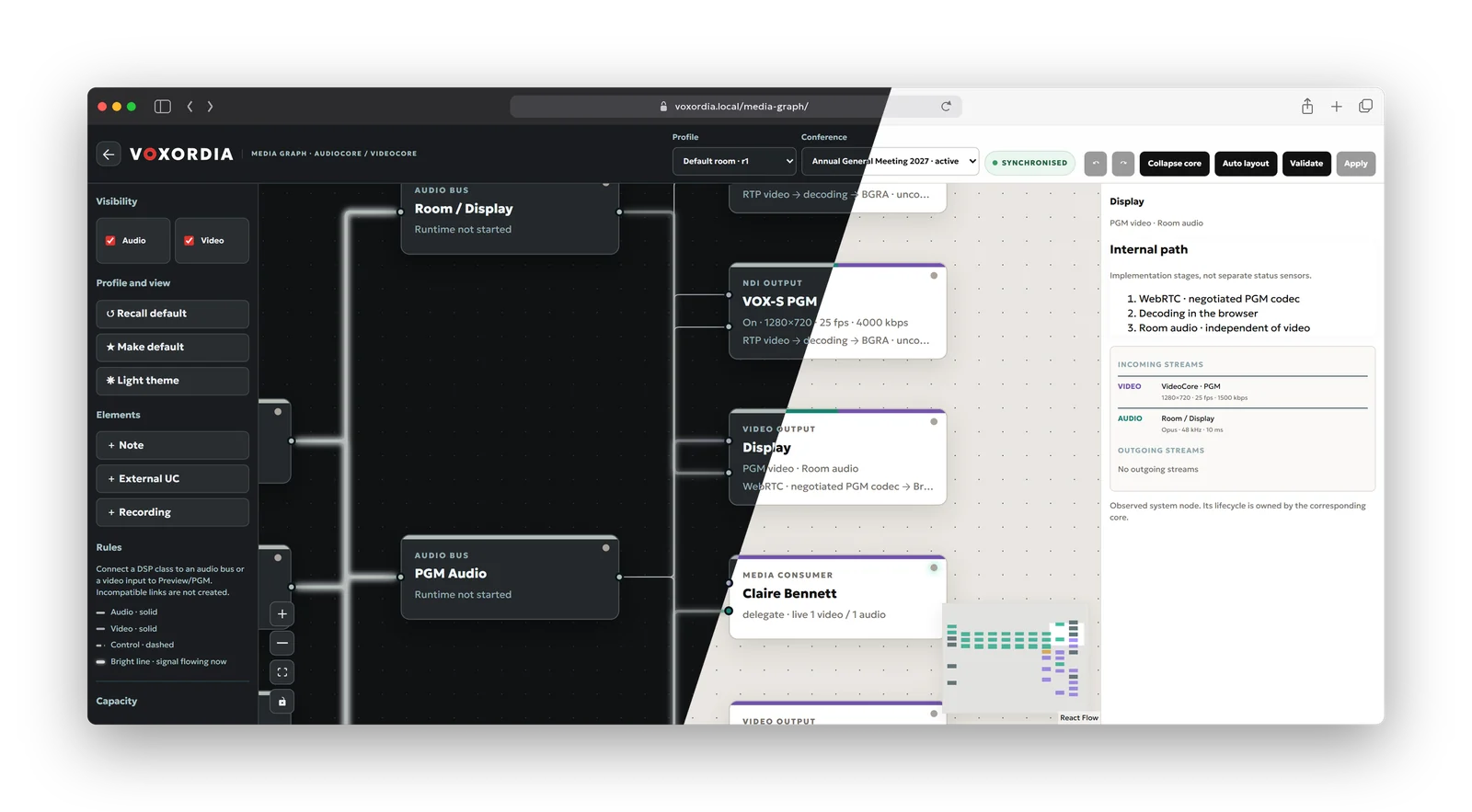
Audio and video map in the browser: sources, processing, VideoCore and outputs
Audio and video mapAll sources, processing and outputs on one live diagram: you can see what is going where right now.
Room control — ControlCoreBuild a panel in a visual designer for the tablet at the room entrance: lights, screens, projector, blinds and the “Start” and “Break” scenes. The same panel is available to staff right inside the meeting. Specific equipment is connected per project.
Who it’s for

For business and for those who build meeting rooms

Business

Boards of directors and management boards, shareholder meetings, negotiations with partners and international meetings with simultaneous interpretation. Voting by shares, sign-in with Active Directory corporate accounts, minutes and recording — in your own room, without renting equipment or calling in engineers.

Integrators

A licence instead of consoles and a cable to every seat. Audio goes to the network over AES67 and is received by Dante systems, video over NDI: VOXORDIA fits into the room you have already built instead of making you rebuild it.

Public authorities

Parliaments, municipal councils and committees: sittings and votes that follow the rules of procedure exactly — with quorum, majority thresholds, roll-call voting and minutes.

Updates and licences

Updates without surprises

New capabilities arrive as a signed package. You install them between meetings, and the licence grows with the room: you pay only for the modules you need.

Signed and verified

Every package is signed by the vendor. The system rejects a forged or damaged file and checks that the server is ready before installing.

Back to a working version

If an installation fails, the system returns to the version that worked. Meetings are never left half-way.

For closed networks

No internet access? The update arrives as an offline package, and the signature check stays the same.

Licence

  • Licence by moduleStart with voting and the minutes. Interpretation, remote participants and room control are added when you need them.
  • One room or severalThe licence grows with the number of seats and rooms. There is no need to replace equipment.
  • Update period in the licenceThe licence states the date until which you receive new versions. Renewal needs no reinstallation.
  • Installed on your commandThe administrator chooses the moment and starts the update from the VOX‑S service interface.
Security

Your data stays with you

This is not a promise but how the system is built. The server stands in your network, speech recognition and translation run on it, and the shared portal only admits a participant by key.

  • Server in your networkThe meeting, recording, documents and minutes live on your server. We do not receive them.
  • Sound and video do not pass through the portalMedia flows directly between the participant and your server. The portal only issues access and never sees the content.
  • Keys in your own storeAccess tokens sit in your server’s protected store. The administrator manages the connection.
  • Action logSign-ins and administrator actions are recorded. You set the retention period.
  • Sign in like at workActive Directory, a personal QR badge or a personal code for the duration of the meeting. No outsider gets in.
  • Secret stays secretThe system records that a person took part in a vote, but never links it to their choice.
  • Signed updatesEvery package is checked against the vendor’s signature before installation, including in a closed network.
  • Minutes without the cloudSpeech is recognised and the approved text translated on your server. Not a single phrase leaves it.
Frequently asked questions

Answers before the first call

Do we need the internet?

No. The meeting, voting, speech recognition and minutes translation all run on your server. The internet is needed only for remote participants.

Where are recordings and documents stored?

On your server, in folders you choose. We receive no recordings, no documents and no participant data.

What do participants need?

Any modern tablet, laptop or phone with a browser. Nothing to install.

How do participants learn about a meeting?

The secretary sends personal invitations by e-mail or Telegram. The participant confirms through the link and, before the start, sees the agenda and the documents opened in advance.

We already have consoles and sound — do we throw them out?

No. Audio goes onto the network via AES67 and is picked up by Dante systems, video via NDI; cameras connect over ONVIF and RTSP.

What does the room need?

A server in your network, a switch and fast Wi-Fi with a route to the server. The system checks the room’s readiness before the meeting.

Can we try it before buying?

Yes. We start with one room in pilot mode: we deploy the server, set up roles and voting rules and run the first meetings together with your team. We discuss the terms at the demonstration.

How is the system updated?

An update arrives as a signed package. Before installing, the system checks the signature and the server’s readiness, and the administrator starts it between meetings. If the installation fails, the system returns to the working version. In a closed network the package can be brought offline.

How does licensing work?

The licence includes the modules you need: voting, interpretation, transcript, remote participation, room control. You can extend it later without changing equipment. The period for receiving new versions is written in the licence itself.

How much does it cost?

It depends on the room: the number of seats and the modules you need — voting, interpretation, transcript, remote participation. New capabilities are added by licence. Tell us about your room and we will send a quote.

Become one of the first VOXORDIA sites

We invite companies and integrators to set up a conference room together with us: we deploy the system, configure it to your procedures and run the first meetings alongside your team.

  • Server in your networkWe deploy the system as one package. Data never leaves the company.
  • Set up to your proceduresRoles, voting rules, languages and participants — to your statutes.
  • The first meetings togetherOur engineers are next to your team at the first conferences.
  • Start with one roomYou can keep your current equipment. Scale up when you are convinced.
Request a pilot
Contact

See it in a live meeting

Tell us about your room and your meetings — we will get in touch and arrange an online demonstration.

  • Server in your network
  • Data never leaves your company
  • Recognition and translation without the cloud
What are you interested in?
Fields marked * are required.